Give your team a better way to handle enquiries, prepare documents and keep track of follow-ups. I build around the tools your business already uses, with staff in control of approvals and important decisions.
New enquiry: “Hi, do you handle trade licence renewals? Mine expires next month.” The system prepares “Follow-up task”: Topic: Licence renewal; Expiry: Next month; Licence copy: Not received yet (flagged for staff to check); Owner: Assigned to a team member. Staff then choose: Approve reply, Edit, Call the customer.
1What comes in
New enquiry
“Hi, do you handle trade licence renewals? Mine expires next month.”
2What the system prepares
Follow-up task
TopicLicence renewal
ExpiryNext month
Licence copyCheckNot received yet
OwnerAssigned to a team member
3What staff do next
Approve replyEditCall the customer
Solutions
Browse by business problem
Each one starts with a single workflow. The system prepares the work, and your staff review it and decide.
Customer enquiries and follow-up
Answers routine questions from approved business information, collects the details staff need, and turns each enquiry into an assigned follow-up task.
Who reviews
Staff pick up the task and handle anything outside the approved answers.
What you get
A new enquiry becomes a structured task with an owner.
Document intake and review
Extracts selected fields from a document, flags missing information, and prepares a draft for staff to check.
Who reviews
Staff compare the draft with the original before using it.
What you get
Less retyping, with a person checking every field.
The examples on this page use fictional sample data.
Internal knowledge and admin
Helps staff find answers in approved documents, drafts routine summaries, and prepares recurring reports.
Who reviews
Staff read the draft and decide what goes out.
What you get
Answers with source references where relevant, so they can be checked.
Workflow automation and integrations
Connects forms, inboxes, CRMs, spreadsheets and existing software. Some workflows use simple rules. Others use AI to interpret or summarise information.
Who reviews
Staff keep working in the tools they already know.
What you get
Information moves between tools without copying and pasting.
I’m exploring Model Context Protocol (MCP) as a way to connect AI tools to approved business systems.
Service area in development
AI search visibility
Reviews how clearly your services and business facts appear online. Example work: checking crawlability, improving key service pages, and tracking discoverability and enquiries.
Who reviews
You approve every change to your pages and business facts.
What you get
A clearer picture of what is published about your business and what changed.
Sometimes called generative engine optimisation (GEO). AI mentions, rankings and lead volume are outside my control, so they are not part of the offer.
Custom business software
Designs a focused dashboard, staff tool or mobile workflow when existing software leaves a gap.
Who reviews
Your team tests it on one real process first.
What you get
One process, with an agreed way to judge whether it works.
Industries
Browse by industry
Each example shows what comes in, what the system prepares and what staff do next. Examples use sample data. Qahvilo is a working demo.
Example workflow
Typing centres
A sample document becomes checked fields for staff.
1What comes in
A customer sends a photo of a document.
Sample document · fictional
NameSam Example
Document no.X0000000
Issue dateNot readable
2What the system prepares
Selected fields are extracted and gaps are flagged.
Fields for checking
Name✓Sam Example
Document no.✓X0000000
Issue dateCheckMissing. Ask the customer
3What staff do next
Staff verify each field against the original.
Staff
Verify the fields
Request the missing date
Submit on the official portal
Example workflow
Business setup firms
A routine enquiry becomes a draft reply, a missing-document checklist or a renewal reminder.
1What comes in
A routine enquiry arrives after hours.
Enquiry · sample
“How much for a free zone licence? I need one visa.”
2What the system prepares
A draft reply and a checklist, built from your approved information.
Prepared for review
Draft replyCheckFrom the approved price list
DocumentsCheckPhoto still missing
RenewalReminder set for 30 days before expiry
3What staff do next
Staff check the draft before anything is sent.
Staff
Approve the final quote
Give the advice
Send or edit the reply
Example workflow
Real estate teams
A listing enquiry becomes a structured lead with requirements and a viewing request.
1What comes in
Someone asks about a listing.
Enquiry · sample
“Is the one-bedroom still available? Can I see it on Saturday?”
2What the system prepares
The requirements are collected into one lead.
Structured lead
ListingOne-bedroom (sample)
Move-inNext month
BudgetCheckNot given yet
ViewingRequested for Saturday, 5 PM
3What staff do next
The agent takes it from there.
Agent
Confirm the viewing
Discuss pricing
Negotiate and commit
Working demo
Restaurants and cafés
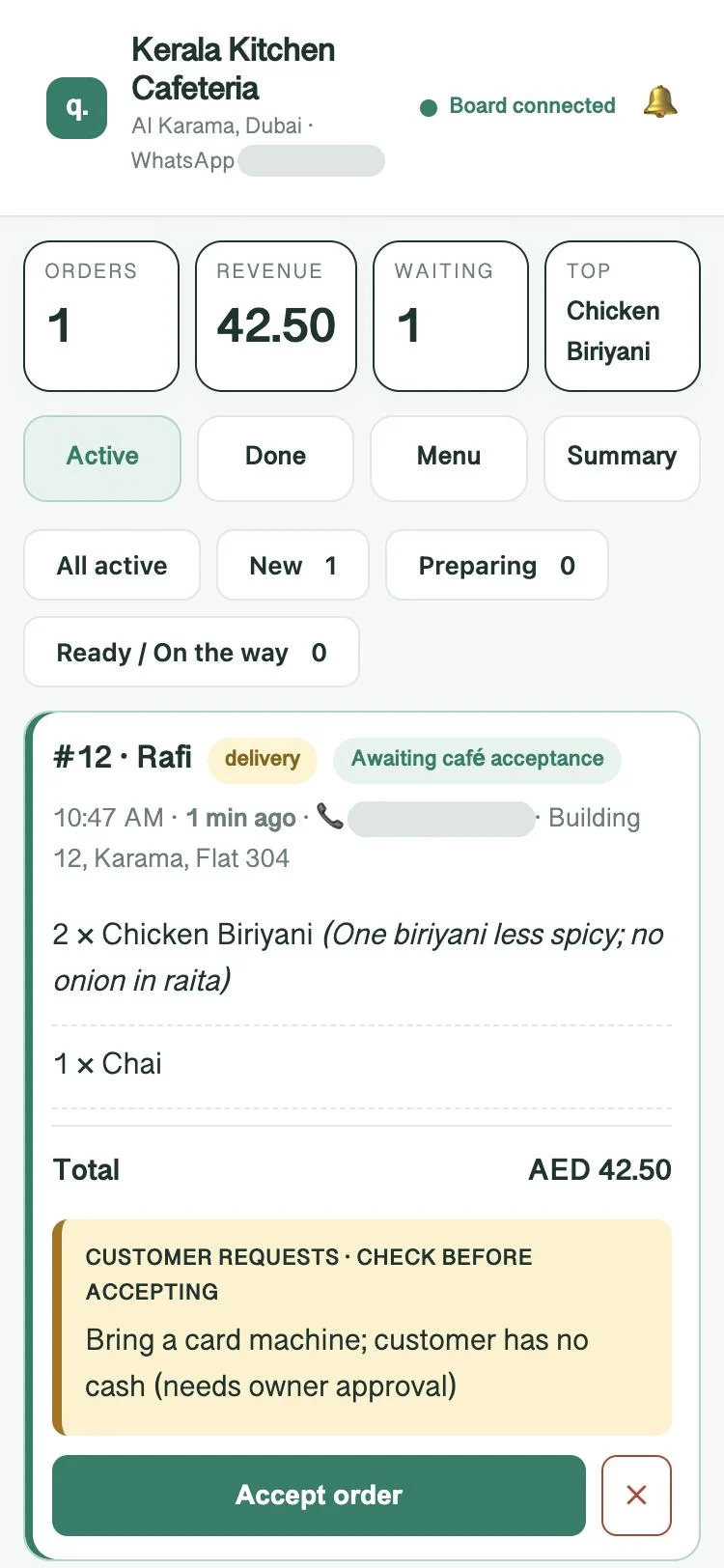
Qahvilo turns a WhatsApp conversation into an order staff can review.
1What comes in
A customer orders in a WhatsApp chat.
WhatsApp · demo business
“2 chicken biriyani and 1 chai please. Can you bring a card machine?”
2What the system prepares
Qahvilo prepares the order and flags the request.
Order for review
2 × Chicken Biriyani
1 × Chai
RequestCheckCard machine. Check before accepting
3What staff do next
Staff check the order in the dashboard.
Staff
Check the special request
Accept or decline the order
Example workflow
Other service businesses
Maintenance firms, traders and other teams: describe one repetitive workflow and I’ll show how it could be handled.
1What comes in
A service request or a quote that went quiet.
Request · sample
“The AC in flat 304 isn’t cooling. Can someone come tomorrow?”
2What the system prepares
The request is captured with the details staff need.
Service request
IssueAC not cooling
Preferred timeTomorrow
QuotationCheckSent 3 days ago, no reply
3What staff do next
Staff assign the job and follow up.
Staff
Assign a technician
Follow up on the quotation
Products
Products and experiments
QahviloWorking demo
A multilingual WhatsApp ordering workflow for restaurants and cafés.
Staff review submitted orders and special requests in a dashboard before accepting them.
An offline-first Flutter document assistant for field teams. It queues questions without a signal and uses Gemini to answer with source citations once connected.
Experimental release · Android
Flutter Document Capture Kit
A Flutter package for capturing documents, extracting editable text on-device, and exporting searchable PDFs.
Identify what the team does today, which tools they use and where work gets stuck.
02
Show one workflow.
Use sample data to demonstrate what the system prepares and what people review.
03
Agree what success looks like.
Define the scope and measure something concrete, such as time spent entering information, missed follow-ups or time to first response.
Who you’d be working with. I’m Muhammed Yaseen, an AI Integration & Automation Specialist at INAXUS in Dubai, with a background in mobile engineering. Yaseen Works is the working name for the AI implementation studio I’m building. See my engineering portfolio →
Contact
What task does your team repeat every week?
Tell me your business type, the task you want to improve, the tools you use today and where I can reply. I’ll come back with questions or a sample of how the workflow could look.
Prefer email? Use this format
Business type:
Task we want to improve:
Tools we use today:
Reply email: